
Find every dead spot in your Wi-Fi
Walk the property. See where the signal dies. Then fix it.
Walk your property with a phone or tablet. HollowMap records GPS-tagged signal samples and paints them on a satellite map, signal, speed, humidity, and AP coverage all side by side.
Free · Windows 10/11 · Microsoft Store
Early access. If you hit an issue, use Help in the app to submit a support ticket.
"It's slow in the back bedroom."
Wi-Fi coverage is invisible. You can't fix what you can't see, and walking the place with a phone app is guesswork without GPS, history, and the controller's view of every AP.
Dead Spots Are Invisible
Without a map of where the signal actually drops, you're moving APs and crossing fingers.
AP Placement Is Guesswork
Should the next AP go on the garage, the eaves, or the hallway ceiling? Coverage data tells you.
No GPS, No Memory
Most signal meters don't tag where you stood. So you can't compare runs, before/after, or weather.
A Survey, A Map, And A Plan
Walk-the-Property Survey
- ✓ Open the web UI on any phone / tablet / laptop on Wi-Fi, no install
- ✓ Tap record, walk; GPS-tagged samples log automatically
- ✓ Optional speed test at a point (download / upload / latency)
- ✓ Label runs (e.g. before-mesh, humid-day) to compare later
Satellite Coverage Map
- ✓ Color by signal, speed, AP, device, or humidity
- ✓ Toggle dots, walk path, AP pins, and heatmap layers
- ✓ Filter by device, run, and date range, live, no Apply button
- ✓ AP aim rays show which way each radio is pointed
UniFi & Omada Aware
- ✓ Polls your controller for live AP and client signal
- ✓ Enriches each sample with which AP it was on
- ✓ Works without a controller too, GPS-only mode
- ✓ Local, on your LAN. Your survey doesn't leave the house
Place & Aim APs
- ✓ Drop AP pins on the map where you actually plan to mount them
- ✓ Set an aim direction for directional antennas
- ✓ Re-survey after the change to see the delta
- ✓ Native Android collector in development for offline runs
See HollowMap
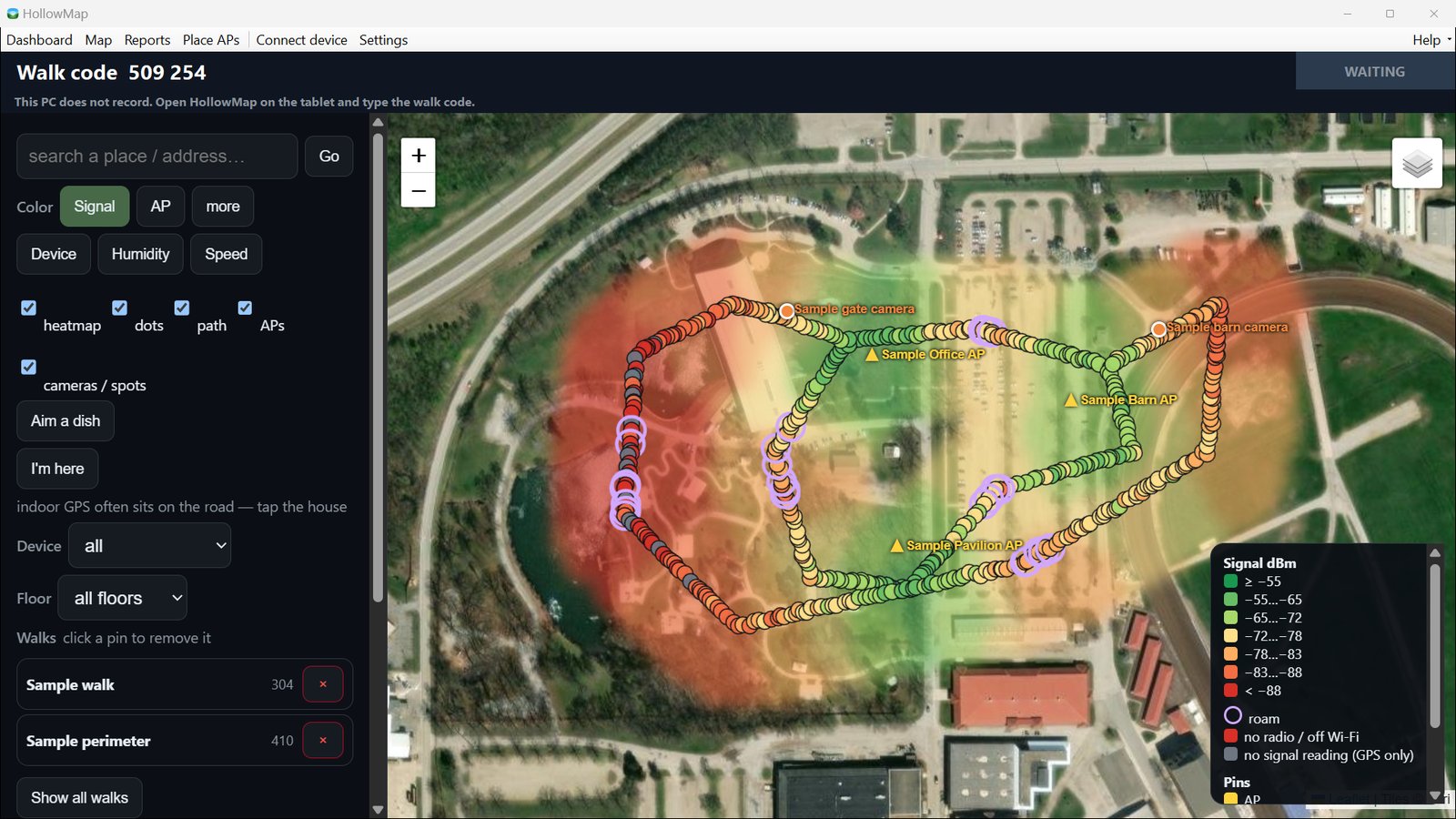
Dead spots show up red
Walk the property and see the signal as you go. APs and cameras are pinned where they really are.
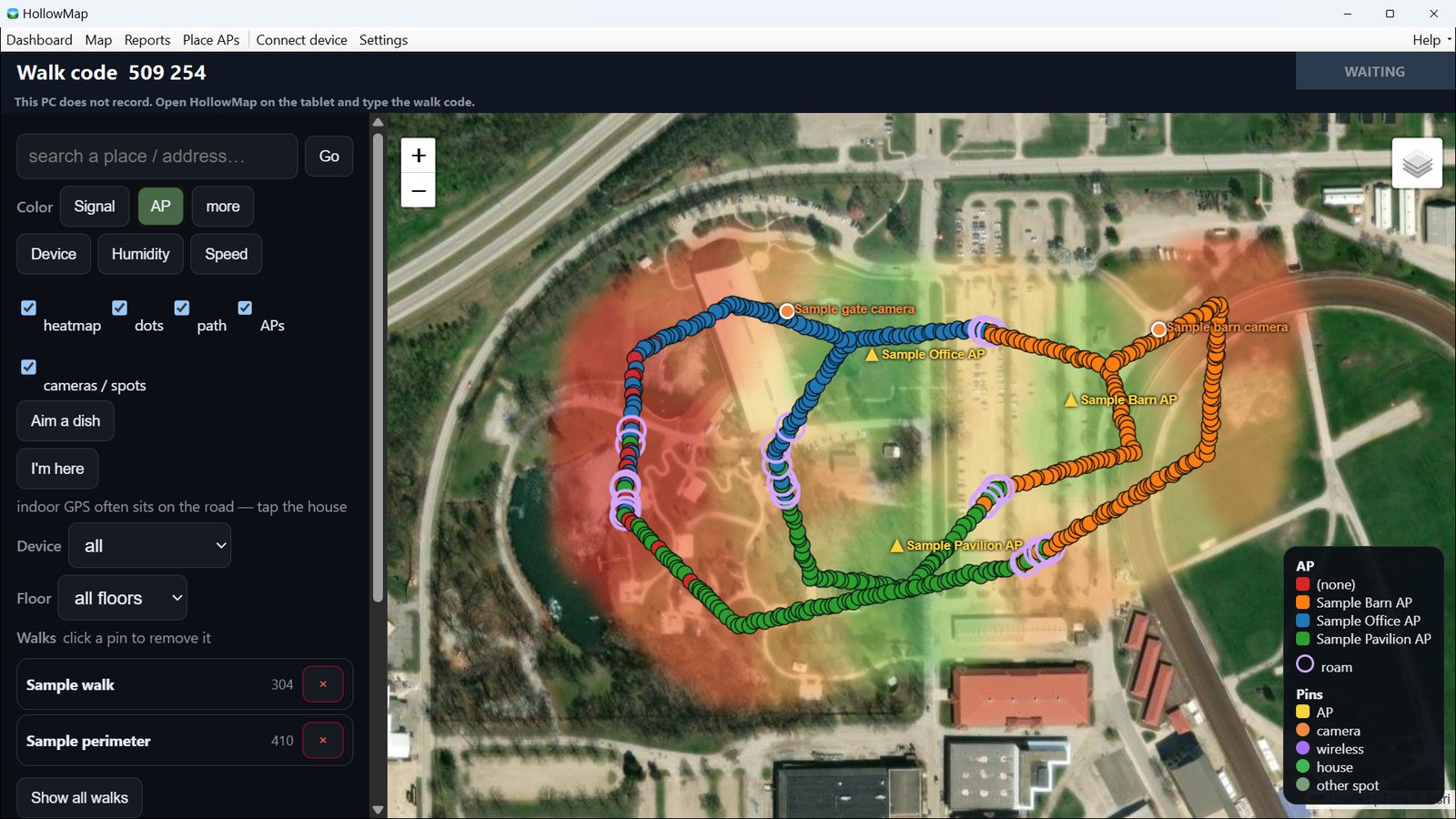
Which AP covers where
Colour the walk by access point to see who serves each spot and where the tablet roams.
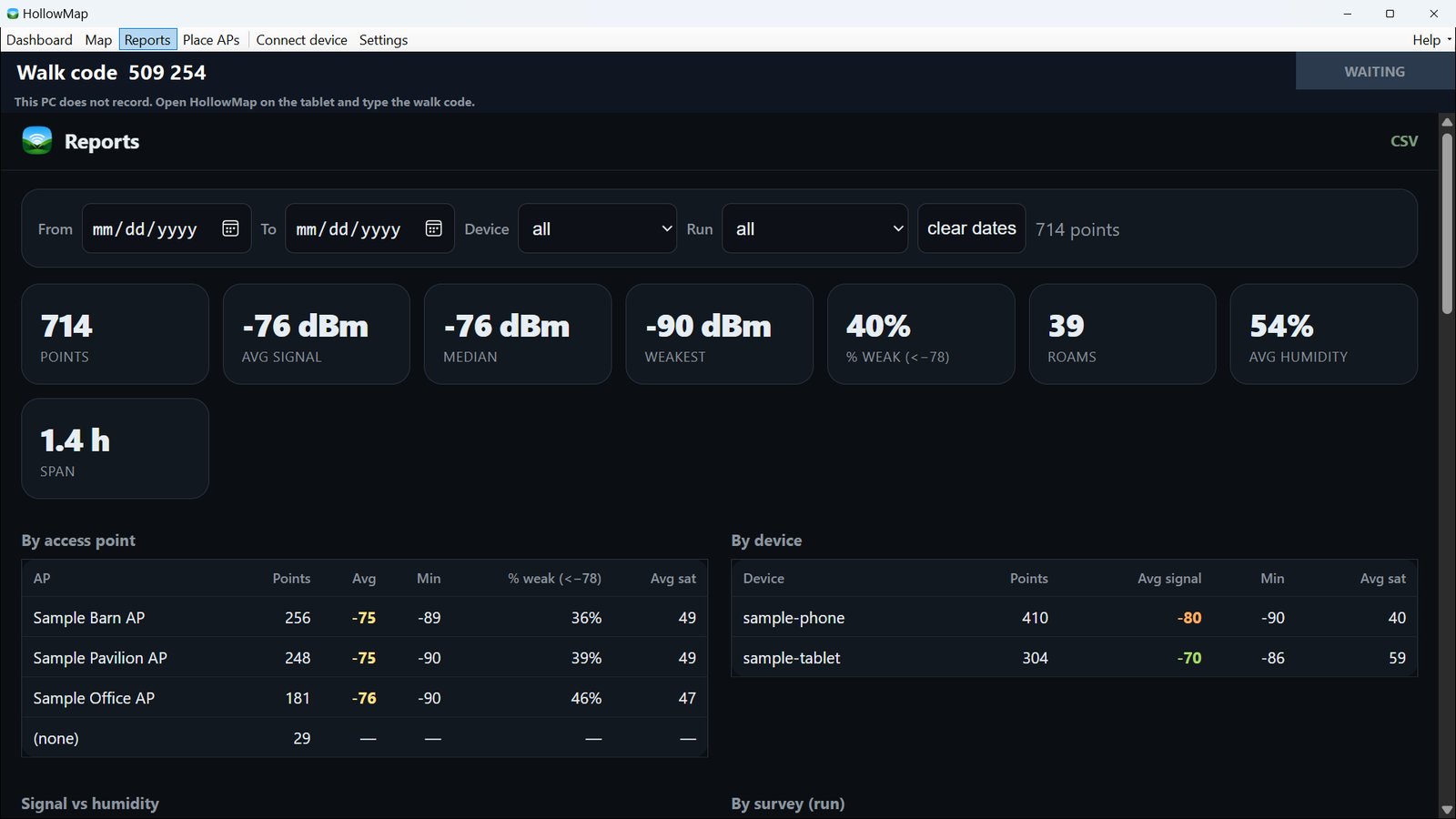
Reports that point at the fix
Weakest spots, per-AP and per-device signal, and roams, so you know where the next AP goes.
Screenshots use a made-up survey on public land.
Who walks with HollowMap
Homes with a problem room
"It's slow in the back bedroom." Walk it once and see exactly where the signal falls off, before buying another extender.
Farms, barns and acreage
GPS-tagged samples on a satellite map show how far the Wi-Fi reaches across the yard, to the barn, and out to the gate.
Placing outdoor cameras
Pin Blink, Nest, or other cameras on the map and check the signal where they'll actually hang.
Small offices and shops on UniFi
Connect the controller and every point records which AP heard the tablet, so you can see coverage and roaming AP by AP.
How It Fits Together
Server + Desktop App
Runs on a Windows machine wired to your switch. Hosts the map, stores samples, polls the controller. WebView2 UI in a tray app.
Any Device
Phone, tablet, or laptop on the same Wi-Fi. Opens the survey page in the browser. No install, scan a QR code and go.
Controller (Optional)
UniFi or Omada, enriches every sample with the AP and signal each client is on. Skip it for GPS-only surveys.
Map your Wi-Fi. Stop guessing.
Self-hosted, local, and free. Your survey data stays on your LAN.
Get it from Microsoft StoreFree · Windows 10/11 · Getting started · Privacy policy
HollowMap is one of the free tools we build at LTC Labs. The rest of the time we modernize and rebuild business software →